AI Chatbots for Business: How They Work and How to Implement One
Learn how AI chatbots work, where they fit in customer support and sales, and the technical steps to plan, build and deploy one for your business.
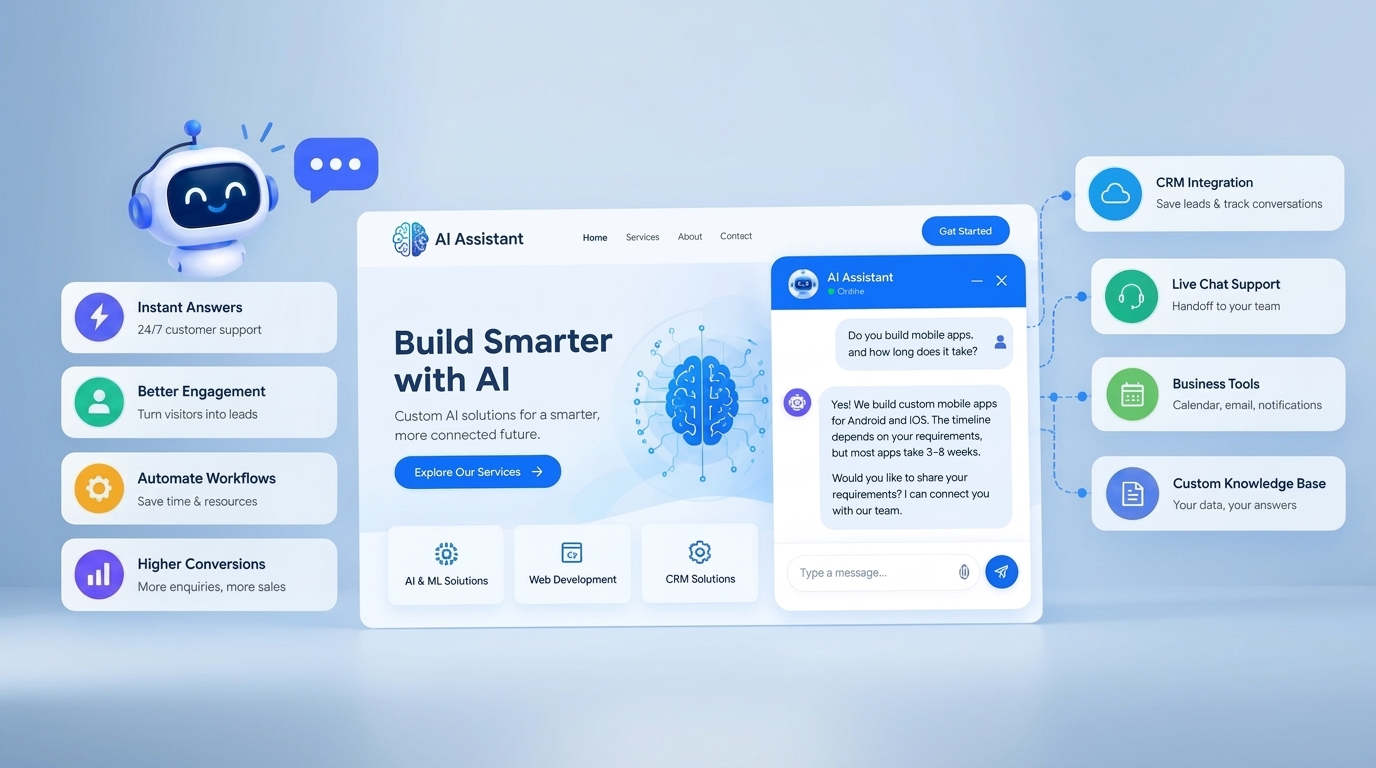
It is 11 PM and a potential customer lands on your website with a simple question: "Do you build mobile apps, and how long does it take?" Your team is offline. The visitor waits a few minutes, finds no answer and moves on to another company.
This is the exact gap that a well-built AI chatbot closes. It answers common questions instantly, collects the visitor's details, routes serious enquiries to the right person and works around the clock. But a good chatbot is not a simple pop-up widget. It is a small software system with language understanding, a knowledge base, integrations and clear safety rules.
In this article, the A3 Fusion Tech team explains how AI chatbots work, where they create real business value, and the technical steps involved in planning and deploying one.
Rule-Based Chatbots vs AI Chatbots
Not every chatbot is "AI". Understanding the difference helps you choose the right solution.
Rule-Based Chatbot
- How it works: Follows fixed menus and scripted flows
- Handling unexpected questions: Often fails or repeats the menu
- Setup effort: Lower, but every flow must be designed manually
- Best suited for: Simple, predictable tasks such as menu-based enquiries
AI Chatbot
- How it works: Understands natural language and generates replies
- Handling unexpected questions: Can interpret the intent behind different wordings
- Setup effort: Needs a quality knowledge base and testing
- Best suited for: Support, lead qualification and varied customer questions
In practice, the best solutions combine both: structured flows for tasks like collecting contact details, and AI for open-ended questions.
How an AI Chatbot Works Behind the Scenes
When a visitor types a message, several technical steps happen within a second or two:
- Understanding the message: A language model interprets what the user wants (the intent) and picks out important details such as service type, name or budget.
- Retrieving company knowledge: Instead of relying only on general training, the chatbot searches your approved content, such as service pages, FAQs and policies. This approach is commonly called Retrieval-Augmented Generation (RAG). It helps keep answers accurate and specific to your business.
- Generating the response: The model writes a reply using the retrieved information, following your tone and rules.
- Applying guardrails: Safety rules control what the bot can and cannot say, for example avoiding price promises, legal advice or topics outside your business.
- Taking action: Through integrations, the bot can save a lead in your CRM, send an email notification, book a meeting or create a support ticket.
- Handing off to a human: When the question is complex, sensitive or the user is frustrated, the conversation transfers to your team with the full chat history.
Core Components of a Business Chatbot
- Language model: The engine that understands and generates text.
- Knowledge base: Verified information about your services, process, pricing approach, policies and FAQs.
- Conversation design: Greeting, tone of voice, quick-reply buttons and clear flows for key tasks.
- Integrations: Connections to your website, CRM, email, calendar and messaging channels such as WhatsApp.
- Guardrails and escalation rules: Boundaries that protect your brand and ensure humans step in when needed.
- Analytics: Dashboards that show what customers ask and where the bot struggles.
Where AI Chatbots Create Business Value
Customer Support
Answer repeated questions about services, timelines, working hours and processes instantly, so your team can focus on complex issues.
Lead Generation and Qualification
Ask the right questions, such as the type of project, timeline and contact details, and pass qualified leads to your sales team automatically.
Appointment and Demo Booking
Let visitors choose a time slot for a call or demo without back-and-forth emails.
Internal Helpdesk
Employees can ask an internal assistant about policies, procedures and documentation instead of searching through folders.
Implementation Roadmap: From Idea to Launch
- Define the goal. Decide the primary purpose: support, lead capture, bookings or all three. A clear goal keeps the project focused.
- Collect and clean your content. Gather accurate service details, FAQs and policies. The chatbot is only as good as the information it is given.
- Design the conversation. Plan the welcome message, quick options, data collection steps and the points where a human takes over.
- Choose the technology. Select the language model, chatbot platform and hosting based on your budget, language needs, data sensitivity and expected volume.
- Build integrations. Connect the chatbot to your website, CRM and notification channels so leads are never lost.
- Test with real questions. Try common queries, unusual wordings, regional-language messages and difficult edge cases. Fix gaps in the knowledge base.
- Launch in stages. Start on a few pages or with a small audience, review conversations and then expand.
- Monitor and improve. Read real chat logs regularly and update the knowledge base as your services change.
Connecting Your Chatbot with a CRM
A chatbot becomes far more valuable when it is connected to your CRM. Every conversation can then create or update a contact record with name, email, phone number, interest area and chat summary. Sales teams see the context before they call, follow-ups can be assigned automatically, and nothing is lost in a chat transcript.
Metrics That Show Whether Your Chatbot Works
- Resolution rate: Share of conversations solved without human help
- Lead capture rate: Share of chats that produce contact details
- Handoff rate: How often the bot transfers to a human, and why
- Response time: Speed of the first and following replies
- Customer satisfaction: Ratings or feedback after the chat
- Unanswered questions: Topics where the bot lacked information, a direct list of what to add next
Risks to Plan For
- Incorrect answers: AI models can produce confident but wrong replies. Grounding answers in your own content, using clear rules and testing thoroughly reduce this risk.
- Data privacy: Chats may contain personal details. Collect only what you need, inform users how their data is used and follow applicable data protection requirements.
- Poor handoff: A bot that traps users in a loop damages trust. Always offer a clear path to a real person.
- Outdated information: A neglected knowledge base leads to wrong answers. Assign someone to review it regularly.
Frequently Asked Questions (FAQs)
Q1: What is the difference between a chatbot and an AI chatbot?
A basic chatbot follows scripted menus. An AI chatbot understands natural language and can respond to a wider variety of questions.
Q2: Can an AI chatbot replace my support team?
It can handle repetitive questions and after-hours enquiries, but human support is still important for complex, sensitive or high-value conversations.
Q3: Can a chatbot be connected to my CRM?
Yes. With the right integration, chatbots can save leads and chat summaries directly into your CRM.
Q4: Can the chatbot reply in Tamil and other regional languages?
Many modern language models support regional languages, but quality varies. It should be tested carefully with real customer messages before launch.
Q5: How long does it take to launch a business chatbot?
A simple website chatbot can be launched quickly, while a chatbot with CRM integration, custom knowledge base and multiple channels takes longer. The timeline depends on scope and content readiness.
Conclusion
A successful AI chatbot is built on clear goals, accurate knowledge, thoughtful conversation design and reliable integrations. When done well, it gives customers instant answers, gives your team qualified leads and gives your business a presence that never closes.
At A3 Fusion Tech, we design and develop AI-powered solutions and CRM integrations tailored to your business. Explore our AI & ML Solutions and CRM Solutions to see how automation can work for you.
Planning an AI chatbot for your business? Contact A3 Fusion Tech to discuss your project.